ARTS & CRAFTS · 4 MIN READ
Longer3D Review: LONGER Laser Engravers and Printers
Nov 04, 2026 · 16K views
In this article
- Longer3D review: engravers first, printers alongside
- Choosing a laser: power, area and materials
- Safety and workspace come first
- Software, learning curve and ongoing costs
- Who Longer3D suits, and who may want something else
- Our verdict: a sensible range for growing makers
- Current offers and a sensible final price
Longer3D review: how the LONGER Ray5, Ray5 miniS and B1 laser engravers compare, where the 3D printers and ePrint UV printer fit, safety and workspace needs, and current offers before you buy.
Desktop laser engravers have moved from niche workshop tools to something crafters set up on a garage bench or spare-room table. Longer3D, which now trades as LONGER, sells a range of these machines along with 3D printers and a newer desktop UV printer. The appeal is turning a design file into an engraved coaster, a cut leather patch or a personalised gift. The challenge is choosing the right machine for the materials you plan to work with, and preparing the space it needs.
This desk review is based on Longer3D's published product information and the offers listed on Dealnory, checked on November 4, 2026. We have not tested the machines. Dealnory may earn a commission through our links at no extra cost to you. Check current Longer3D offers once you know which machine fits your projects.
Longer3D review: engravers first, printers alongside
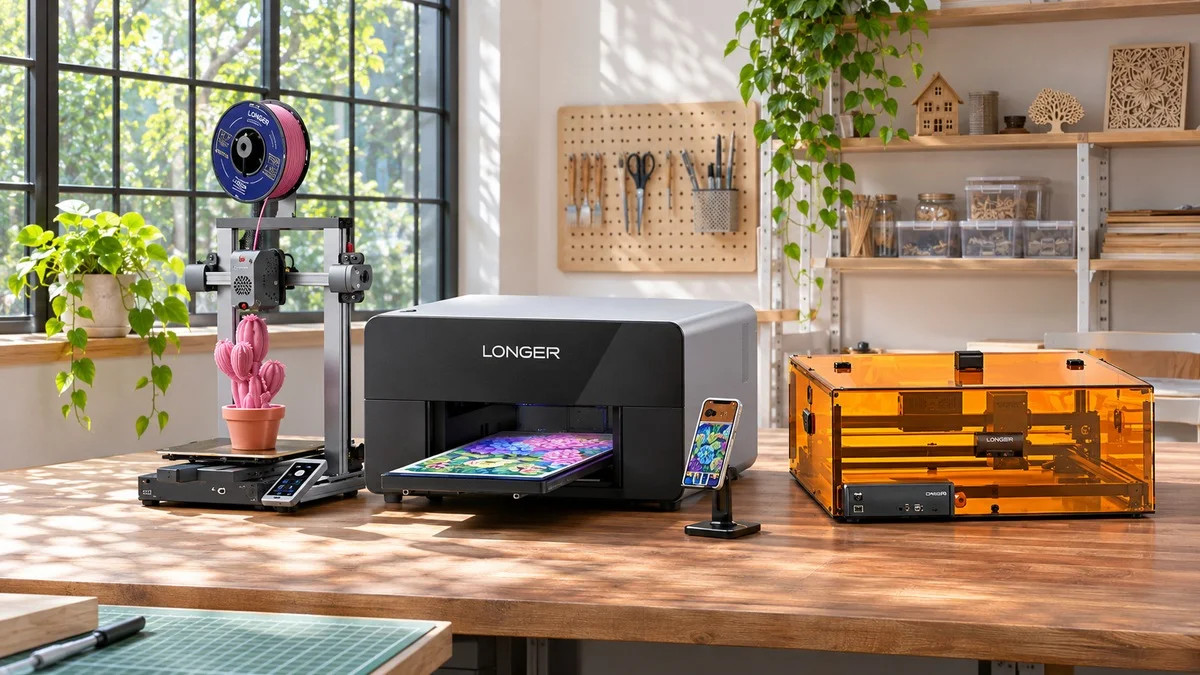
LONGER's laser line is the heart of the store. The Ray5 comes in 5W, 10W and 20W versions and is presented by the brand as a beginner-friendly engraver, the Ray5 miniS is a more compact option, and the B1 comes in 20W, 30W and 40W versions for buyers who want more power. The store also sells 3D printers, such as the LK10 Plus, plus accessories and materials.
The newest addition is the ePrint, a dual-head desktop UV printer that prints directly onto objects. It sits in a different price bracket from the engravers and is aimed at people producing personalised items in volume, such as small online shops, rather than occasional hobby use.
Choosing a laser: power, area and materials
Laser power is the headline figure, but more is not automatically better. Higher-wattage models generally cut thicker material and work faster, while lower-wattage machines handle engraving on wood, leather and similar materials at a lower price. Write down the materials and thicknesses you expect to use most, then compare that with what each model and power option is listed to handle.
Working area matters as much as power. A compact machine like the Ray5 miniS saves bench space, while a larger frame lets you engrave bigger pieces or batch several small ones at once. If you plan to sell products, think about how many items you need to make per session and choose a machine that will not become the bottleneck.
Safety and workspace come first
Laser engraving produces smoke and fumes, and the beam can harm eyes. Budget for proper eye protection, good ventilation or an enclosure with extraction, and a fire-safe surface before your first project. Never leave a running laser unattended, and check which materials should not be lasered at all, since some plastics release harmful fumes.
Place the machine somewhere stable, away from flammable clutter, with room to load and unload material. A garage or workshop with an open window or exhaust route is usually a better home than a living room, especially if you plan longer jobs.
Software, learning curve and ongoing costs
Expect a learning period. You will need to prepare designs, set speed and power for each material and run test pieces to dial in results. Starting with inexpensive scrap wood and simple designs is the quickest way to understand how your machine behaves before working on finished pieces.
Ongoing costs include materials, replacement parts over time and any safety accessories you add. For the 3D printers, filament and spare nozzles are the regular expense, and for the UV printer, inks and maintenance will be part of the running budget, so check those costs before you buy.
Who Longer3D suits, and who may want something else
LONGER suits hobbyists and crafters who want to personalise wood, leather and similar materials, small sellers making custom products, and schools or makerspaces introducing digital fabrication. The Ray5 range is the natural entry point for a first laser, while the B1 and ePrint make more sense for people ready to produce in volume.
It is a weaker fit if you have no ventilated space for a laser, need industrial throughput, or want a fully plug-and-play experience with no learning curve. In those cases a local makerspace or a professional engraving service may be a better first step.
Our verdict: a sensible range for growing makers
Longer3D makes the most sense when you know what you want to make and have a safe space to make it. The Ray5 family covers first-time engraving, the B1 adds power for heavier projects, and the 3D printers and ePrint UV printer extend the store toward full small-scale production.
Pick the power and working area that match your main materials, budget for safety equipment from day one, and expect to spend time learning settings. With that preparation, a LONGER machine can be a practical starting point for a creative side business or hobby.
Current offers and a sensible final price
Longer3D currently lists free shipping on orders over $49 in the US and EU, discounts of up to $320 on the B1 and Ray5 laser engravers compared with their regular prices, a launch offer on the ePrint dual-head UV printer from $1,799, buy now, pay later in four payments at 0% APR, and a 12-month warranty on its machines. Add the cost of safety gear and materials to the machine price, and confirm whether you are buying from the US or European store, before checkout. Check the latest Longer3D coupons and offers on Dealnory to see what is active today.
Coupon codes, deals and availability depend on Longer3D's current terms and may change or expire.
Sources and disclosure: Longer3D official product pages and the offers listed on Dealnory, checked November 4, 2026. Editorial assessment of published information, not a hands-on test. Dealnory may earn commission from qualifying purchases. Images are editorial illustrations.