TECH & GADGETS · 11 MIN READ
UGREEN AI NAS Review 2026: Smart Private Cloud Storage for Home, Creators & Business
Aug 22, 2026 · 4.7K views
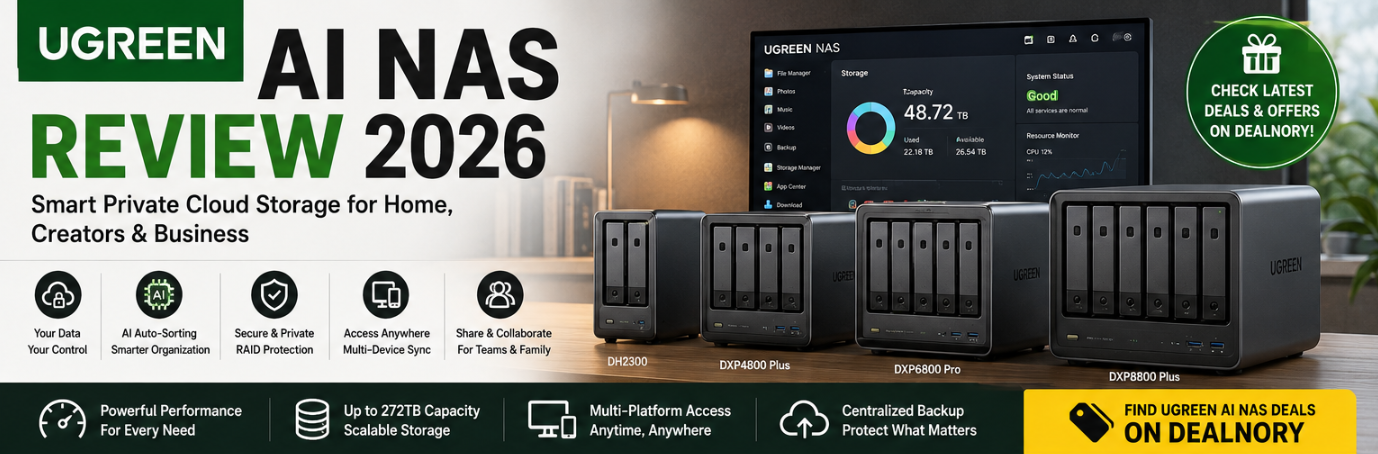
As photos, videos, documents, backups and work files continue to grow, traditional external hard drives are no longer always enough. Cloud storage is convenient, but monthly subscription fees and concerns about where your data is stored can make a private NAS (Network Attached Storage) an attractive alternative.
That's where UGREEN AI NAS comes in.
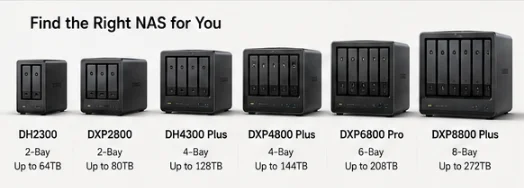
UGREEN's NASync lineup is designed to give users their own centralized storage system, with models ranging from compact 2-bay NAS devices for home users to powerful 8-bay systems designed for professionals and teams. The current UGREEN lineup includes models such as the DH2300, DH4300 Plus, DXP2800, DXP4800 Plus, DXP4800 Pro, DXP6800 Pro and DXP8800 Plus.
👉 Looking for UGREEN NAS deals?
Check the latest UGREEN AI NAS deals & offers on Dealnory before you shop.
What Is UGREEN AI NAS?
UGREEN AI NAS is a range of network-attached storage devices designed to create a personal or business cloud storage environment.
Instead of keeping important files scattered across:
- Laptops
- Smartphones
- External hard drives
- USB drives
- Multiple cloud services
you can centralize your data on your own NAS.
UGREEN positions its NAS products for several use cases, including families, content creators, power users and businesses. Its official NAS selector also allows shoppers to choose products based on requirements such as backup, remote access, file sharing, multimedia, productivity and team collaboration.

Why Choose a NAS Instead of Traditional Cloud Storage?
Cloud storage is convenient, but a personal NAS offers a different approach.
With UGREEN NAS, you can build a centralized storage system that you control.
☁️ Traditional Cloud Storage
You typically:
- Pay a recurring subscription
- Upload files to a third-party server
- Depend on internet access
- Share storage with a cloud provider
🏠 UGREEN NAS
You can:
- Build your own private storage
- Back up multiple devices
- Access files remotely
- Share files with family or colleagues
- Store photos and videos centrally
- Expand storage depending on the NAS model
- Manage your own storage environment
UGREEN specifically promotes its NAS products as a way to keep files organized, protected and accessible without relying entirely on subscription-based cloud storage.
UGREEN NAS for Home Users
You don't need to be a professional IT user to benefit from NAS.
For families, a NAS can act as a central place for:
- Family photos
- Smartphone backups
- Home videos
- Movies
- Music
- Important documents
- Computer backups
UGREEN's home NAS solutions emphasize automatic backups, multi-device synchronization, remote access and centralized media management.
UGREEN NASync DH2300
The DH2300 is positioned as an entry-level NAS for home users.
It features:
- 2 drive bays
- Up to 64TB storage capacity
- 1GbE network connection
- 8-core Rockchip processor
- AI-powered automatic sorting
The current official store listing shows the DH2300 from around $227.99, although prices and promotions can change.
For someone buying their first NAS, this is one of the more approachable options in the UGREEN lineup.
UGREEN NASync DH4300 Plus
If you need more capacity and faster networking, the DH4300 Plus moves up to a 4-bay design.
It offers:
- Up to 128TB storage capacity
- 2.5GbE network connection
- 8-core Rockchip processor
- AI automatic sorting
- Support for home and work environments
UGREEN currently positions it as a beginner- and family-friendly NAS with performance suitable for home and work.
The current listed price is around $399.99, compared with a regular price of $439.99 on the official site at the time of checking.
UGREEN NAS for Creators
Content creators have very different storage requirements.
Photographers, videographers and designers can quickly accumulate hundreds of gigabytes—or even terabytes—of:
- RAW photos
- 4K video
- Project files
- Photoshop files
- Lightroom catalogs
- Final exports
- Client assets
UGREEN's NAS lineup is designed to provide centralized storage and synchronization for these workflows.
The company's official solutions specifically highlight creators who need large files to remain synchronized, backed up and accessible across devices.
UGREEN NASync DXP2800
The DXP2800 is a 2-bay model designed for users who want higher-performance personal storage.
The current product listing gives it:
- Up to 80TB capacity
- 2 drive bays
- High-speed storage capabilities
- Support for home and professional workflows
The official site currently lists the DXP2800 from around $369.99, with the exact price depending on the configuration.
For photographers and creators who don't need a large 6- or 8-bay system, the DXP2800 can be an interesting middle ground.
UGREEN NASync DXP4800 Plus
The DXP4800 Plus is one of the more interesting options for users who want a powerful all-round NAS.
It features:
- 4 drive bays
- Up to 144TB capacity in the listed configuration
- Intel Pentium Gold 8505 5-core CPU
- Support for SSD expansion
- High-speed storage and networking capabilities
UGREEN currently lists the DXP4800 Plus from around $619.99, compared with a listed regular price of $729.99.
This makes it particularly appealing for users who need more than basic home backup.
UGREEN NASync DXP4800 Pro
For heavier workloads, the DXP4800 Pro provides a more powerful 4-bay solution.
UGREEN currently lists the DXP4800 Pro with:
- 4 drive bays
- Up to 144TB storage
- Intel-based processing
- Professional-oriented performance
- Support for demanding storage workflows
The current official price starts around $679.99, versus a listed regular price of $799.99.
This model makes more sense for:
Creators + professionals + power users
rather than someone who only needs basic photo backup.
UGREEN NASync DXP6800 Pro
If four drive bays aren't enough, the DXP6800 Pro expands the system to six bays.
UGREEN lists:
- 6 drive bays
- Up to 208TB capacity
- Intel Core i5-1235U processor
- Dual 10GbE networking
- Professional-oriented performance
The official store currently lists it at around $1,099.99.
This is a serious NAS for users managing large amounts of data.
For example, it could be suitable for:
- Professional photographers
- Video production
- Small businesses
- Large media libraries
- Advanced backup systems
- Team file storage
UGREEN NASync DXP8800 Plus
At the top end of the current lineup sits the DXP8800 Plus.
This model provides:
- 8 drive bays
- Up to 272TB storage capacity
- Dual 10GbE network ports
- Large-scale storage capability
UGREEN currently lists the DXP8800 Plus at around $1,369.99, although configurations and promotions can change.
For individuals with enormous media libraries or businesses requiring significant storage capacity, this is one of the most capable options in the current UGREEN NAS lineup.
UGREEN NAS Storage Capacity
One of the biggest advantages of a multi-bay NAS is flexibility.
Depending on the model, UGREEN currently offers systems ranging from:
2 bays → 4 bays → 6 bays → 8 bays
with listed capacities reaching:
Up to 272TB on the DXP8800 Plus configuration.
However, remember that the advertised maximum capacity depends on the configuration and drive capacity.
UGREEN also notes that hard drives are sold separately on relevant NAS products.
So when calculating your actual budget, don't look only at the NAS enclosure price.
Consider:
NAS + HDD/SSD + optional accessories
UGREEN NAS and RAID
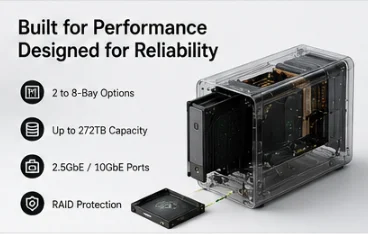
For users storing important data, RAID can be an important part of a NAS setup.
UGREEN provides a RAID Calculator and product comparison tools to help users determine how different drive configurations affect usable capacity and data protection.
RAID can help improve:
- Data redundancy
- Storage reliability
- Drive management
- System resilience
However, RAID should not be considered a complete backup strategy.
For critical files, maintaining an additional backup is still recommended.
UGREEN NAS Remote Access
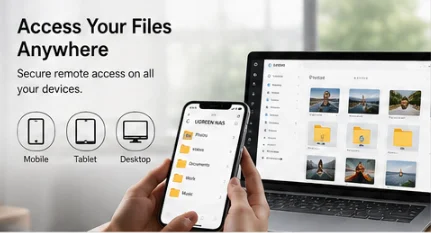
One of the biggest benefits of having a NAS is that your files don't necessarily need to stay accessible only from your home network.
UGREEN promotes remote access and file sharing across devices and locations.
This can be useful when you want to:
- Access photos while traveling
- Download work files remotely
- Share videos with family
- Send large files
- Access documents away from home
The official site also provides guides covering remote access through UGREENlink, DDNS and Tailscale.
UGREEN NAS for Photos & Videos
For photographers, one of the most appealing features is centralized photo management.
Instead of having:
Phone → Google Photos
Camera → SD Card
Laptop → SSD
Desktop → Hard Drive
you can build a centralized photo library on your NAS.
UGREEN highlights features such as:
- Smart photo organization
- Multi-device synchronization
- Real-time backups
- Smart album categorization
- Movie poster organization
- HDMI video output
This can make a NAS particularly attractive for people with large photo and video collections.
UGREEN NAS as a Home Media Server
UGREEN also promotes NAS as a private multimedia platform.
You can use compatible NAS systems to organize:
- Movies
- TV shows
- Music
- Photos
- Personal videos
The official home solution highlights features including movie poster walls, smart album categorization and HDMI video output.
For households with a large personal media library, this can turn the NAS into more than just a backup device.

UGREEN NAS for Small Businesses
UGREEN NAS isn't only designed for home users.
For small businesses and teams, a NAS can provide a centralized file server where employees can:
- Store documents
- Share folders
- Manage permissions
- Synchronize files
- Maintain backups
- Access shared data
- Collaborate on projects
UGREEN specifically promotes NAS solutions for business with features such as RAID protection, automatic backups and version history.
This can be useful for teams that don't want every employee storing important company files locally.
UGOS Pro
UGREEN NAS devices operate with the company's UGOS Pro software environment.
UGREEN highlights features including:
- Storage Manager
- Security Manager
- Photos
- TextEdit
- Sync & Backup
- Multi-terminal compatibility
The idea is to bring multiple storage and productivity functions into a single NAS environment rather than requiring separate applications for every task.
AI Features on UGREEN NAS
The "AI" in UGREEN's updated NAS web presence isn't simply a marketing name.
The company is integrating AI-assisted functions into its ecosystem.
For example, the DH2300 and DH4300 Plus currently advertise AI Auto-Sorting, which can help organize stored content.
UGREEN has also expanded the official website domain to ai.ugreen.com, explaining that the change reflects a broader range of smart technology products and services planned for the platform.
UGREEN AI NAS Pricing
UGREEN's current NAS lineup covers a very wide price range.
| Model | Bays | Listed Capacity | Current Listed Price* |
|---|---|---|---|
| DH2300 | 2 | Up to 64TB | ~$227.99 |
| DXP2800 | 2 | Up to 80TB | ~$369.99 |
| DH4300 Plus | 4 | Up to 128TB | ~$399.99 |
| DXP4800 Plus | 4 | Up to 144TB | ~$619.99 |
| DXP4800 Pro | 4 | Up to 144TB | ~$679.99 |
| DXP6800 Pro | 6 | Up to 208TB | ~$1,099.99 |
| DXP8800 Plus | 8 | Up to 272TB | ~$1,369.99 |
*Prices and promotions can change. The figures above reflect the official store listings checked for this article.
Important: NAS drives may be sold separately, so factor HDD/SSD costs into the total budget.
Which UGREEN NAS Should You Choose?
🏠 For Home & Beginners
Consider:
UGREEN DH2300
It's a compact 2-bay option designed for basic home cloud storage, backups and everyday use.
👨👩👧 For Families & Home + Work
Consider:
UGREEN DH4300 Plus
The 4-bay design and 2.5GbE connection provide more room for growing storage needs.
📸 For Creators
Consider:
UGREEN DXP2800 / DXP4800 Plus / DXP4800 Pro
These models offer more performance and capacity for large photo and video libraries.
🏢 For Professional Users & Teams
Consider:
UGREEN DXP6800 Pro
Its 6-bay configuration and dual 10GbE networking make it better suited to larger workloads.
🚀 For Maximum Storage
Consider:
UGREEN DXP8800 Plus
With 8 bays and up to 272TB of listed capacity, it's designed for serious storage requirements.
UGREEN AI NAS Pros & Cons
✅ Pros
- Wide range of NAS models
- Options from 2-bay to 8-bay systems
- High maximum storage capacity
- Suitable for home users and professionals
- Centralized photo and video storage
- Remote file access
- Multi-device synchronization
- RAID support
- Business-oriented features
- AI-powered sorting on selected models
- UGOS Pro ecosystem
- Official product comparison and NAS selector tools
⚠️ Things to Consider
- HDDs/SSDs may need to be purchased separately
- Higher-capacity NAS systems can become expensive
- Storage drives add significantly to the total cost
- More advanced models may be unnecessary for basic home backups
- RAID is not a substitute for an independent backup
- Choosing the right number of bays requires some planning
Is UGREEN AI NAS Worth It?
For anyone who has outgrown external hard drives or wants more control over their digital files, UGREEN AI NAS is definitely worth considering.
The biggest advantage is the range of choices.
You can start with a relatively compact 2-bay NAS for home backups and move all the way to an 8-bay system capable of handling hundreds of terabytes of storage.
For photographers and video creators, the combination of centralized storage, synchronization, backup and remote access can simplify large-file workflows. For families, it can become a private photo and media library. For small businesses, it can function as a centralized file server and collaboration platform.
Where to Find UGREEN AI NAS Deals
Because UGREEN NAS devices can represent a significant investment, it's smart to check current promotions before ordering.
👉 Check UGREEN AI NAS deals, discounts & offers on Dealnory
You can also browse the official UGREEN NAS store here:
The official store is currently running various discounts across selected NAS models, including promotional pricing on the DXP4800 Plus, DXP4800 Pro, DH2300, DXP2800 and other systems.
Final Verdict
UGREEN AI NAS is more than a simple storage box.
It's a way to build your own centralized digital environment for photos, videos, documents, backups, media and collaborative files.
Whether you're a family looking for a personal cloud, a photographer managing thousands of RAW files, a content creator working with large video projects, or a small business that needs centralized storage, there's a UGREEN NAS model designed around different levels of storage and performance.
And with options ranging from 2 bays to 8 bays and up to 272TB of listed capacity, UGREEN offers plenty of room to scale as your storage requirements grow.
🔥 Before you buy
Check the latest UGREEN AI NAS deals on Dealnory and compare the total cost of the NAS plus the HDD/SSD drives you'll need.
Your data. Your storage. Your private cloud.
FAQ
What is UGREEN AI NAS?
UGREEN AI NAS is a range of network-attached storage products designed for centralized storage, backups, file sharing, remote access and multimedia management.
How much storage can UGREEN NAS support?
Depending on the model and drive configuration, UGREEN's current lineup reaches up to 272TB on the DXP8800 Plus.
Does UGREEN NAS include hard drives?
Not necessarily. UGREEN notes that hard drives are sold separately for its NAS systems, so shoppers should include drive costs when calculating their total budget.
Which UGREEN NAS is best for beginners?
The DH2300 is positioned by UGREEN as an entry-level home NAS and offers up to 64TB of listed capacity.
Which UGREEN NAS is best for creators?
The DXP2800, DXP4800 Plus and DXP4800 Pro are particularly interesting options for creators who need more storage capacity and performance.
Does UGREEN NAS support remote access?
Yes. UGREEN provides remote-access capabilities and documentation covering UGREENlink, DDNS and Tailscale.
Where can I find UGREEN NAS deals?
You can check the latest offers on Dealnory's UGREEN AI NAS page before purchasing.