PHOTOGRAPHY & CREATIVE TOOLS · 9 MIN READ
Retouch4me AI in 2026: How Lab Video, Apex and Arams Are Changing Photo & Video Retouching
Aug 12, 2026 · 8.4K views

Retouch4me continues to expand its AI-powered toolkit for photographers, retouchers, and video creators. The latest updates bring several useful improvements across photo retouching, batch processing, and video editing — including the new Retouch4me Lab Video, more precise control in Apex, smarter gender-specific retouching in Arams, and performance improvements for video plugins.
For creators handling weddings, portraits, boudoir sessions, commercial photography, music videos, or social media content, these updates are particularly interesting because they focus on one thing: reducing repetitive editing work without giving up creative control.
In this guide, we'll look at the newest Retouch4me features and how they can fit into a modern photography and video workflow.
Dealnory Tip: If you're planning to purchase Retouch4me products, you can check the latest available Retouch4me coupons and deals on Dealnory before buying.
1. Retouch4me Lab Video: AI Color Grading and Film Texture
One of the biggest additions is Retouch4me Lab Video, a new AI-powered plugin designed for automatic video color grading and film emulation.
Unlike traditional color grading workflows that can require manually creating and adjusting multiple nodes, Lab Video uses AI to analyze the footage and harmonize colors automatically.
The plugin is designed for OFX-compatible editors, including DaVinci Resolve 18+, allowing the processing to happen directly inside the editing environment.
What can Retouch4me Lab Video do?
AI-powered color grading
Lab Video analyzes video frames and automatically works with their colors to create a more coherent grade.
This can be particularly useful when you're working with large projects where manually matching and adjusting footage can consume significant amounts of time.
Film emulation
Digital footage can sometimes have an extremely clean or sterile appearance. Lab Video adds film grain and subtle optical imperfections to help create a softer, more organic film aesthetic.
The effect can be used as a final stylistic layer or as a starting point before additional creative grading.
Direct OFX integration
Another major advantage is that the plugin operates directly inside compatible editing software.
That means you don't necessarily need to export footage to another application simply to apply the effect.
Useful for different types of video projects
Lab Video can be particularly interesting for:
-
Wedding filmmakers
-
Music video creators
-
Commercial videographers
-
YouTube creators
-
Social media content producers
-
Cinematic video projects
Retouch4me describes Lab Video as offering a perpetual license, local processing, and free updates, making it an interesting option for creators who want to incorporate AI-assisted color grading into their long-term workflow.
👉 Explore Retouch4me Lab Video with the SAVE10 offer
2. Retouch4me Apex v1.211: More Precise Mole Control
Retouch4me Apex has also received an important update.
Version 1.211 expands the capabilities of the Heal tool with two particularly useful features: Moles Slider and Keep Bindi.
Moles Slider
AI retouching doesn't always need to mean completely removing every imperfection.
In portrait photography, a mole may be part of someone's natural appearance or even an intentional characteristic that the photographer wants to preserve.
The new Moles Slider provides more control over how the AI handles detected moles.
You can adjust the result to:
-
Keep moles completely
-
Soften them subtly
-
Remove them entirely
This gives photographers more control over how aggressive the automatic retouching should be.
Keep Bindi
Apex v1.211 also introduces a Keep Bindi toggle.
The feature is designed to prevent traditional forehead jewelry known as bindis from being automatically removed by the Heal tool.
When brush mode is enabled, the protected area can also be highlighted on the mask, making it easier to understand which area is being protected.
This is a thoughtful improvement for photographers working with culturally diverse portrait sessions where certain visual elements should remain untouched.
👉 Get Retouch4me Apex and explore the latest Heal controls
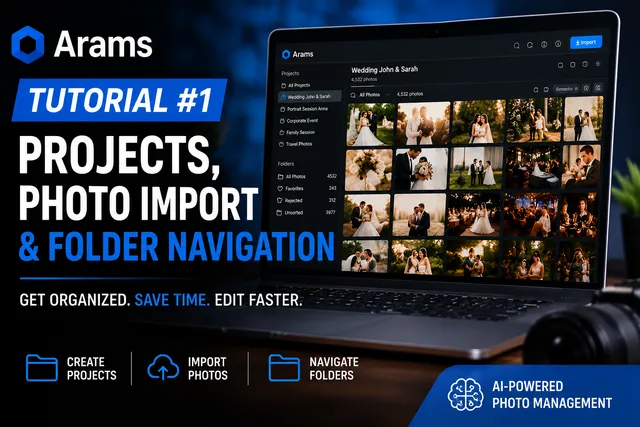
3. Retouch4me Arams v1.10.0: Smarter Batch Retouching
For photographers working with hundreds or thousands of images, automation becomes especially valuable.
The latest Retouch4me Arams v1.10.0 update introduces several improvements designed to make batch processing more intelligent and convenient.
Different retouching for men and women
One of the most notable changes is the ability to use different retouching settings for men and women.
Arams can detect faces and apply separate presets.
For example, a photographer can use:
-
Softer skin retouching for female portraits
-
A more textured and natural treatment for male portraits
This can be especially useful for large portrait, wedding, boudoir, or commercial projects where a single retouching preset may not work equally well for every subject.
Work with culling results
Arams now provides more flexibility when reviewing culling results.
You can choose to view only the selected photographs or use a mixed view mode with visual separation.
That can make it easier to move from the culling stage to automated processing without losing track of the images you've selected.
Automatic PC shutdown
This is a small feature that could make a surprisingly big difference for photographers processing large batches.
You can queue a large shoot for export before going to bed and enable automatic PC shutdown.
Arams can complete the processing and then shut down the computer automatically.
For photographers dealing with large wedding galleries or commercial shoots, this can make overnight batch processing much more convenient.
Improved file sorting
Arams also improves how files with standard numbering are sorted.
Instead of confusing sequences such as:
IMG_1 → IMG_10 → IMG_2
the software can sort files in proper numerical order:
IMG_1 → IMG_2 → IMG_10
It's a small workflow improvement, but one that becomes valuable when you're working with large collections of photographs.
👉 Explore Retouch4me Arams and its latest batch-processing features
4. Retouch4me Video Retouching Plugins Get Performance Improvements
Retouch4me has also updated its video retouching tools, including:
-
DnB OFX
-
3D LUT Creator OFX
-
Heal OFX
The latest improvements focus on stability and frame-processing speed.
For video editors, performance matters enormously because a tool that works well on a single photograph can become much more demanding when applied across hundreds or thousands of frames.
Improving stability and processing speed can therefore make AI-assisted video retouching more practical for real-world production.
👉 Explore Retouch4me Video Retouching plugins with SAVE10
5. Retouch4me Is Expanding Beyond Simple Skin Retouching
One of the most interesting things about Retouch4me's recent development is that the platform is becoming more than a collection of automatic skin-retouching plugins.
The latest tools cover different parts of the creative workflow:
| Workflow | Retouch4me solution |
|---|---|
| AI color grading | Lab Video |
| Film texture | Lab Video |
| Portrait cleanup | Apex |
| Mole control | Apex |
| Bindi protection | Apex |
| Gender-specific retouching | Arams |
| Image culling | Arams |
| Batch processing | Arams |
| Video retouching | DnB OFX / Heal OFX |
| Video color workflow | 3D LUT Creator OFX |
This broader approach is important because professional photographers rarely spend their time doing just one type of edit.
A wedding photographer might need to cull thousands of images, process portraits, correct skin, clean backgrounds, and then deliver the final gallery.
A filmmaker might need to retouch footage, apply color grading, create a film aesthetic, and process large amounts of video.
The more of these repetitive tasks can be automated, the more time creators can spend on the creative side of their work.
6. New Educational Content for Photographers
Retouch4me has also continued to publish educational material focused on practical workflows.
Recent tutorials cover subjects such as Photoshop selection masks using text prompts, Arams batch workflows, and practical applications of plugins including:
-
Heal
-
Dodge & Burn
-
Mattifier
-
Portrait Volumes
-
Fabric
-
Clean Backdrop
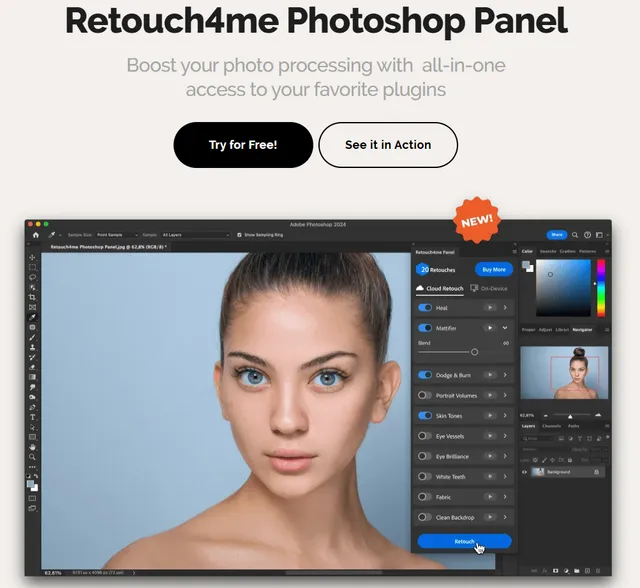
There is also educational content demonstrating how the Retouch4me panel can be combined with Photoshop layers, Liquify, and Camera Raw.
This is particularly useful for photographers who don't want AI to completely replace their editing process.
Instead, the more effective approach can be to combine AI automation + manual creative control.
The AI handles repetitive work, while the photographer maintains control over the final artistic result.
7. How Retouch4me Can Fit Into a Professional Workflow
A practical Retouch4me workflow could look something like this:
Step 1: Cull the shoot
Start by sorting through the images and selecting the photographs worth processing.
Arams is designed to help with this type of large-scale workflow.
Step 2: Batch process the selected images
Instead of manually opening and editing every image, automated processing can handle repetitive adjustments across a large batch.
Step 3: Refine portrait details
Tools such as Apex can help with automatic retouching while still providing controls for details that should be preserved.
The new Moles Slider is a good example: AI can identify the area, while the photographer decides how much retouching is appropriate.
Step 4: Keep culturally important details intact
Features such as Keep Bindi demonstrate an important principle of AI retouching: automation should not remove details simply because they are detected as imperfections.
The photographer should remain in control.
Step 5: Finish manually
AI doesn't have to be the final step.
Photoshop, Camera Raw, Liquify, layers, masks, and other creative tools can still be used to refine the final image.
Step 6: Apply the same philosophy to video
For video projects, Lab Video and the updated OFX plugins can help automate parts of color grading and retouching while leaving room for creative adjustments afterward.
8. Who Should Consider Retouch4me?
Retouch4me may be particularly useful for creators who regularly deal with high-volume editing.
Wedding photographers
Wedding photographers often return from a single event with hundreds or thousands of photographs.
Automation can reduce the amount of repetitive work involved in preparing those images.
Portrait photographers
Portrait photographers can use AI-assisted retouching to speed up common skin and cleanup tasks while retaining control over the final look.
Boudoir photographers
The combination of batch processing and automatic retouching can be especially useful for photographers working through large boudoir sessions.
Commercial photographers
Commercial work often requires consistent treatment across large image sets.
Automated workflows can help establish a more efficient starting point for further creative editing.
Video creators
With Lab Video and the updated OFX tools, Retouch4me is also becoming increasingly relevant to filmmakers, YouTubers, and other video professionals.
9. Is Retouch4me Worth Trying in 2026?
The latest updates suggest that Retouch4me is moving toward a broader AI-assisted production ecosystem rather than focusing exclusively on individual photo-retouching tasks.
The addition of Lab Video expands its reach into video color grading and film emulation.
Meanwhile, Apex v1.211 gives photographers more nuanced control over AI retouching, while Arams v1.10.0 makes large-scale photo workflows more intelligent and automated.
The most important point is that these tools aren't necessarily about eliminating human editing.
Instead, the biggest advantage may be using AI to remove repetitive work so photographers can spend more time making creative decisions.
10. Where to Find Retouch4me Deals
If you're interested in testing Retouch4me, you can start with the latest products directly through the links above.
Before purchasing, it's also worth checking the latest Retouch4me coupon codes and deals on Dealnory to see whether additional savings are available.
You can also explore the full Retouch4me ecosystem through the Retouch4me website.
For creators looking for AI-powered tools that can handle repetitive photo and video editing tasks while leaving room for manual creative control, the latest 2026 updates make Retouch4me a particularly interesting platform to explore.
Final Thoughts
Retouch4me's newest releases show a clear direction: more automation, more intelligent controls, and a broader range of creative workflows.
From the cinematic color and film texture of Lab Video, to the improved precision of Apex, and the smarter batch-processing capabilities of Arams, these updates are aimed at solving practical problems photographers and video creators encounter every day.
And perhaps that's where AI-assisted editing is most useful — not replacing the photographer's vision, but taking care of the repetitive tasks that get in the way of it.
Created by photographers, for photographers.